Top Retail Touch Screen Kiosk Manufacturers in China
China has become a major sourcing hub for retail display hardware. Its manufacturers produce touch kiosks for supermarkets, shopping malls, pharmacies, airports, and branded stores. This guide examines leading Retail Touch Screen Kiosk manufacturers in China and explains what separates dependable suppliers from attractive but risky options.
The evaluation focuses on practical evidence. We consider screen brightness, touch accuracy, processor performance, enclosure materials, thermal control, and software compatibility. We also examine production experience, quality management, customization ability, and after-sales support. A kiosk beside a store entrance must withstand fingerprints, daily contact, trolley movement, and changing indoor temperatures. Small details matter, including cable access, ventilation openings, screen glare, and the stability of the base.
Factory visits, product samples, and customer feedback can reveal more than a polished website. Reliable suppliers should provide clear specifications, testing records, warranty terms, and realistic delivery schedules. They should also explain whether components are standard, customized, or difficult to replace. That answer can affect long-term operating costs.
No ranking is perfect. Supplier strengths change over time, and one manufacturer may suit a mall project but fail a compact retail rollout. Some companies communicate impressively yet provide limited technical evidence. Others appear less polished but deliver consistent engineering support. This guide therefore encourages careful comparison, sample testing, and direct questions before purchase. The goal is not to promote the loudest name. It is to identify capable Chinese manufacturers that can support secure, practical, and durable retail deployments.
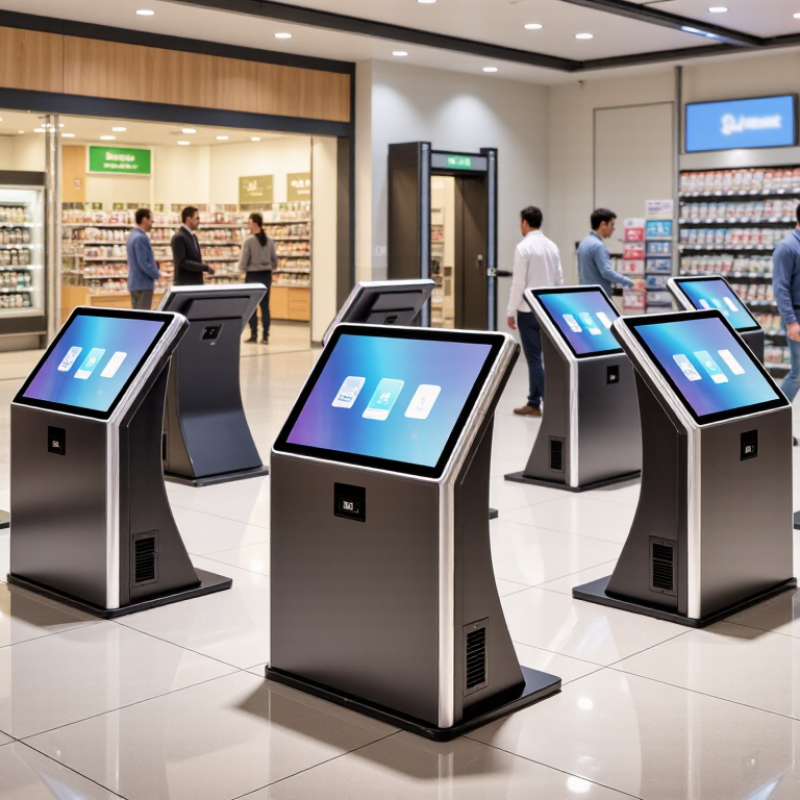
What Retail Touch Screen Kiosks Are and How They Work
A retail touch screen kiosk is a self-service station that helps shoppers find products, check details, or complete simple tasks. Its display responds to taps, allowing customers to browse clear menus without handling printed catalogs. Inside, a compact computer runs the kiosk software and stores or retrieves product information. Some units include barcode scanners, receipt printers, card readers, or cameras, depending on their intended use.
A shopper might tap a category, search for a product, and view its price, size, or aisle location. The software processes each selection and displays the next relevant screen. When connected to a store’s inventory system, the kiosk can show current availability, though updates may take time to appear. No staff interaction is needed. If a shopper requests help, the screen can direct them to an employee or service counter.
Good kiosk design uses large text, simple navigation, and a screen positioned for comfortable reach. Clear prompts matter, especially when shoppers are moving quickly or carrying bags. Still, the experience is not always seamless: glare can obscure the display, and a misplaced button can cause repeated taps. Small usability tests in the actual store often reveal these problems before shoppers do.
Core Features and Technologies Used in Retail Kiosks
A retail touch screen kiosk must respond quickly, stay readable under bright lights, and tolerate repeated use. Projected capacitive touch is common because it supports responsive multi-touch and a smooth glass surface. In a busy shop, that surface still needs regular cleaning. A matte or anti-glare finish can reduce reflections near windows, though it may slightly soften the image. Small details matter.
The display should suit its location. A kiosk beside a sunlit entrance may need higher brightness than one inside a dim fitting area. Fanless processors can reduce noise and dust intake, while careful ventilation helps manage heat during long operating hours. Connectivity may include Wi-Fi, Ethernet, Bluetooth, and ports for printers or scanners. Secure device management and encrypted data handling are important when kiosks connect to store systems. I would not judge a unit by its screen alone.
When comparing manufacturers in China, ask how they test touch accuracy, screen durability, and thermal performance over extended operation. Check whether the mounting, cable access, and service panels fit the store layout. A sleek enclosure can be awkward to maintain. That deserves a second look. Also confirm which operating systems and software interfaces are supported, since compatibility can vary between configurations.
How to Assess Chinese Retail Kiosk Manufacturers
Top Retail Touch Screen Kiosk Manufacturers in China
How to Assess Chinese Retail Kiosk Manufacturers
Assessing a Chinese retail kiosk manufacturer takes more than comparing unit prices. Grand View Research estimated the global self-service kiosk market at USD 34.45 billion in 2023, projecting an 11.8% compound annual growth rate through 2030. This growth makes supplier claims easy to find, but harder to verify. Ask for a factory audit, traceable component specifications, and references from installations similar to yours. Check screen brightness under store lighting, touch response with gloves, and cabinet stability on uneven floors. Small details matter.
Request a working sample and test it for several days. Measure boot time, heat around the display, and how quickly staff can replace a payment module or printer. Review warranty terms, spare-parts availability, software update procedures, and response times across time zones. Ask whether quoted certifications apply to the exact kiosk configuration, not merely a similar product. A neat showroom demo proves little about months of daily use. No checklist removes every risk. I would still want the manufacturer to explain one past failure and what changed afterward. That answer can be more revealing than a polished presentation.
Leading Retail Touch Screen Kiosk Manufacturers in China
China’s leading retail touch-screen kiosk manufacturers are best judged by how well their hardware fits daily store work. Check screen response with gloved hands, text readability under bright shop lighting, and access to printers or scanners. Ask for panel brightness, operating temperature, and service-part availability in writing. A clean demo is not enough.
Grand View Research estimated the global self-service kiosk market at USD 28.34 billion in 2023 and forecast an 11.8% compound annual growth rate from 2024 to 2030. The category includes more than retail touch-screen units, so the figure is market context, not a China-specific sales measure. Still, it signals growing demand for dependable self-service equipment. Reliability matters.
When comparing Chinese manufacturers, request a pilot unit and test it during a real shift. Watch for missed taps, screen glare, slow restarts, and loose cable connections. Confirm who handles firmware updates and replacement parts after delivery. A lower quote may hide integration work or longer support delays. I would also check sample records carefully; specifications can look precise while real store conditions expose gaps.
Applications and Emerging Trends in Retail Kiosk Solutions
Retail touch-screen kiosks serve different tasks across a store. Shoppers can check product availability, compare sizes, find aisle locations, or place orders when an item is out of stock. At checkout, a clear screen and responsive payment flow can reduce queues during busy periods. Some stores also use kiosks for loyalty sign-ups and product information. A useful kiosk fits the space: a compact unit near a fitting room has different needs from a large directory near the entrance. Yet a polished screen does not guarantee a better visit. Poor placement still causes confusion.
Tips: Test the kiosk with real shoppers before a full rollout. Check screen height, glare, loading speed, and how easily users can return to the home page. Keep instructions brief. Leave room for staff assistance, especially when payment or order pickup is involved.
Emerging trends include touchless navigation, multilingual interfaces, and links between kiosks, mobile shopping, and store inventory systems. Retailers are also exploring privacy-conscious analytics to understand which pages shoppers use, rather than collecting unnecessary personal details. These features can help, but they add maintenance work and may fail when networks are unreliable. Simple offline guidance matters. A practical design should make common tasks quick, show clear error messages, and offer a visible way to ask for help.